Title Tags: The Complete Guide
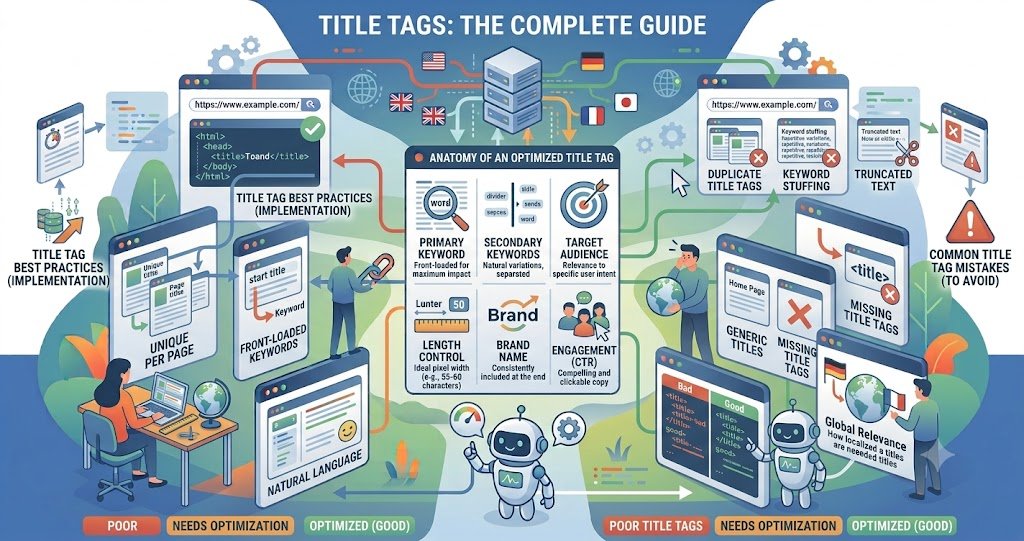
Your title tag is the single most visible piece of SEO real estate you control — it’s the blue link in search results, the browser tab label, and often the first thing a searcher judges before they even see your content. Get it wrong, and even great pages get skipped over. This guide covers what actually matters in 2026: pixel width over character counts, keyword placement, and how title tags now function in an AI-driven search landscape.
Table of Contents
- What Is a Title Tag?
- Why Title Tags Still Matter in 2026
- The Real Length Limit: Pixels, Not Characters
- Best Practices for Writing Title Tags
- Common Mistakes to Avoid
- How to Audit Your Titles
- Conclusion
- FAQs
Key Takeaways
- Google truncates titles based on pixel width (~600px on desktop), not a fixed character count — a 72-character title can display fully while a 58-character one gets cut.
- The practical safe zone is still 50–60 characters, since it reliably avoids truncation regardless of letter width.
- Google can and does rewrite title tags it deems unhelpful, so alignment with on-page content matters as much as the tag itself.
- Put primary keywords near the beginning; save brand names for the end.
- In 2026, titles also act as a “source citation anchor” in AI Overviews — they matter even when the user doesn’t click.
What Is a Title Tag?
A title tag is an HTML element (<title>Your Page Title</title>) placed in a page’s <head>. It doesn’t appear on the page itself but shows up as the clickable headline in search results, browser tabs, and social shares (unless overridden by Open Graph tags).
Why Title Tags Still Matter in 2026
Title tags remain a confirmed on-page ranking signal and the primary driver of click-through rate from the SERP. What’s changed is the environment around them: with Gemini-powered AI Overviews answering queries directly on the results page, <cite index=”6-1″>your title tag increasingly functions as a source citation anchor — even users who don’t click still register your brand as the authoritative answer, building recognition that shapes their next search</cite>.
The Real Length Limit: Pixels, Not Characters
This is the part most guides get wrong. <cite index=”3-1″>Google’s rendering engine doesn’t count characters — it measures horizontal pixel width and truncates once the total exceeds roughly 600px</cite>. <cite index=”3-1″>Because letters like W and M are much wider than i or l, a 58-character title full of wide letters can truncate while a 72-character title made of narrow letters displays in full</cite>.
That said, character counts remain a useful shorthand because most titles use a natural mix of letter widths. <cite index=”1-1″>The practical target is 50–60 characters, or approximately 600 pixels wide, with truncation typically kicking in between 525–535 pixels</cite>. If you want certainty, run your title through a pixel-width checker rather than just counting letters.
It’s also worth noting: <cite index=”1-1″>Google has confirmed it indexes every keyword in a title regardless of whether it’s visibly truncated</cite>, so a slightly longer, more descriptive title isn’t wasted — it just may not display in full.
Best Practices for Writing Title Tags
- Front-load your primary keyword. Search intent match near the start improves both relevance signals and scannability.
- Use hyphens, not pipes. <cite index=”1-1″>Hyphens read cleaner and display more reliably than pipe characters</cite>.
- Put the brand name last. Unless brand recognition is the goal, lead with the page’s value proposition.
- Write one unique title per page. Duplicate titles confuse both users and crawlers about which page answers a given query.
- Match search intent explicitly. A vague title like “Best Email Marketing Tools for Small Businesses in 2026” <cite index=”7-1″>may get shortened to just “Best Email Marketing Tools,” dropping the audience qualifier that would have earned the click</cite>.
- Avoid dated titles unless you’ll maintain them. A “2026 Guide” title implies an annual update commitment.
Common Mistakes to Avoid
- Keyword stuffing — unnatural repetition often triggers Google to rewrite the title itself.
- Relying purely on character count instead of checking pixel width.
- Letting CMS defaults (like appending the site name to every title) bloat length unnecessarily.
- Ignoring mobile pixel width, which is narrower than desktop.
How to Audit Your Titles
<cite index=”6-1″>Google Search Console remains the most reliable audit tool — specifically the Performance Report, where pages with high impressions but low CTR usually signal a weak or mismatched title</cite>. Pair this with a dedicated pixel-width checker to catch truncation issues character counting alone would miss, and review titles against actual rendered SERP previews before publishing at scale.
Conclusion
Title tags haven’t lost relevance in 2026 — they’ve gained a second job. They still need to fit Google’s display constraints and earn the click, but they now also serve as the label AI systems cite when summarizing your content. The fundamentals — pixel-aware length, front-loaded keywords, and genuine intent match — remain the foundation. Audit regularly, trust Search Console data over guesswork, and treat every title as both a search result and a citation.
Frequently Asked Questions
What is the ideal title tag length? Around 50–60 characters, or under roughly 600 pixels on the desktop. This avoids truncation for most letter combinations.
Does Google use characters or pixels to measure title length? Pixels. Character count is only a practical approximation since letter widths vary.
Will Google rewrite my title tag? Yes — if it decides your title doesn’t accurately reflect the page or match search intent, Google may generate its own version for the SERP.
Are title tags still a ranking factor? Yes, they remain a confirmed on-page signal, alongside their major role in influencing click-through rate.
Should I include my brand name in every title? Generally yes, placed at the end, unless brand character budget is better spent on descriptive keywords.