
Google Business Profile: The Complete Guide
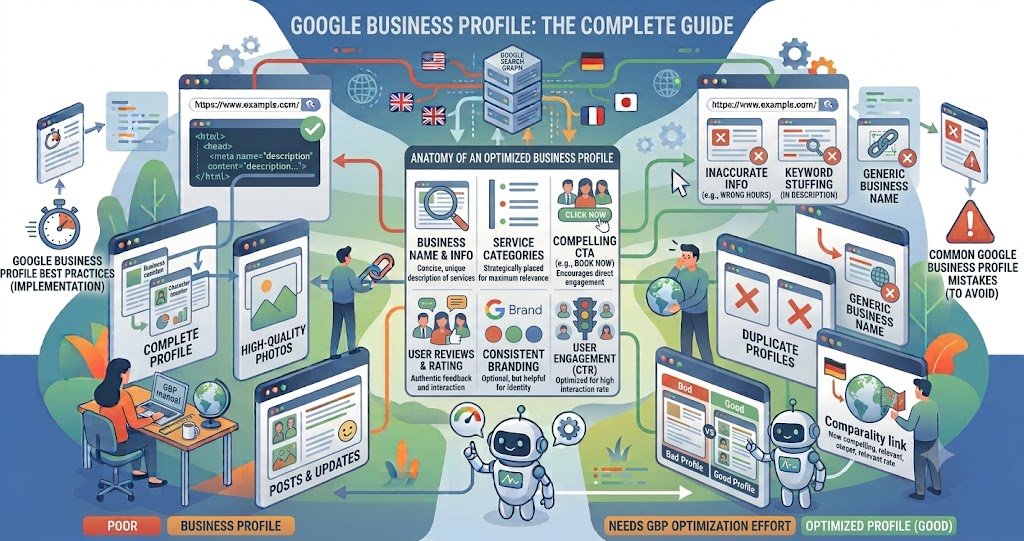
When someone searches for a nearby business, they rarely ask a friend anymore — they type it into Google and expect an instant answer: hours, directions, reviews, a phone number. That answer comes from a Google Business Profile (GBP), the free listing formerly known as Google My Business. It’s the single biggest lever most local businesses have over how they appear on Search and Maps, and in 2026, it’s doing even more work than before: Google’s AI Overviews now pull directly from complete, verified profiles to answer queries like “best physiotherapist near me.” This guide covers what GBP is, why it matters, and how to set one up and optimize it properly.
Table of Contents
- Key Takeaways
- What Is a Google Business Profile
- Why It Matters in 2026
- Setting Up and Verifying Your Profile
- Core Features to Optimize
- Measuring Performance
- Conclusion
- FAQs
Key Takeaways
- GBP is a free Google tool for managing how a business appears on Search and Maps.
- Video verification is now the default method for new listings in most regions.
- Choosing the narrowest, most accurate primary category is one of the strongest ranking levers available.
- Posts, photos, and Q&A function as engagement and conversion tools rather than direct ranking factors, but they still shape whether searchers act.
- A steady stream of reviews over time outperforms a sudden burst followed by silence.
- Businesses that actively manage all profile features see meaningfully more profile views and website clicks than those with basic, incomplete listings.
- AI-generated reviews, fake Q&A answers, and fabricated business details violate Google’s content policy and can trigger automated profile suspension.
What Is a Google Business Profile
A Google Business Profile lets a business control its name, address, hours, phone number, website link, photos, and description as they appear across Google Search and Maps. Customers can also leave public reviews and star ratings, message the business, and, where supported, book appointments directly — often without ever visiting the business’s own website.
Why It Matters in 2026
The profile is no longer just a listing; it’s a digital storefront. Since Google’s AI Overviews began surfacing for local queries, incomplete or unverified profiles have become largely invisible in AI-generated answers, since those answers draw from verified, fully filled-out listings. Practically, this means an unclaimed or half-finished profile isn’t just a missed opportunity — it’s an active disadvantage.
Setting Up and Verifying Your Profile
Claiming a profile starts at Google Business Profile Manager, where you enter your business name, category, location, and contact details. Verification confirms the business is legitimate and real, and video verification — a short walkthrough showing signage, interior, and a live management action — has become the standard method for new listings. Getting this right the first time avoids delays that can leave a listing unranked for weeks.
Choosing the Right Category
Your primary category is arguably the single most consequential setting on the profile. A generic category like “Law Firm” performs very differently in Maps visibility than a precise one like “Personal Injury Attorney.” Always choose the narrowest category that accurately describes the core business.
Core Features to Optimize
Business description: This appears in the Knowledge Panel — often a searcher’s first impression. Lead with the primary keyword and city, and write for humans, not algorithms; keyword stuffing is actively penalized.
Photos: Add authentic interior, exterior, and work photos at least monthly. Google’s systems can detect stock imagery, and it consistently underperforms real photos.
Posts: What’s New, Offers, Events, and Product posts publish directly to Search and Maps. They expire after seven days, so consistency matters more than a single strong post. They act as free mini-ads and engagement drivers rather than direct ranking signals.
Reviews: Respond to all reviews, and aim for a steady drip rather than a spike. Review velocity — consistency over time — tends to outperform a large batch acquired all at once.
Q&A and attributes: Keep the Q&A section current, and fill in accessibility, payment, and other attributes relevant to your category — these details increasingly feed AI-generated answers.
Measuring Performance
GBP Insights shows profile views, website clicks, direction requests, messages (if enabled), and bookings (if using a supported provider). A high view count paired with low website clicks usually points to weak photos or a thin description — the profile is attracting attention but not converting it.
Conclusion
A Google Business Profile is one of the few marketing assets that’s both free and directly tied to how AI and search systems represent a business to potential customers. Completing every field, verifying properly, choosing the right category, and maintaining a steady rhythm of posts, photos, and reviews compounds over months into meaningfully more visibility, calls, and inquiries.
Frequently Asked Questions
Is Google Business Profile free? Yes. Creating, verifying, and managing a listing costs nothing.
How is GBP different from Google My Business? They’re the same product — Google rebranded Google My Business as Google Business Profile.
How long does verification take? It varies by method and region, but video verification, now standard for many new listings, is designed to resolve faster than older postcard-based verification.
Do Google Posts affect rankings? Not directly. They influence click-through and engagement within the local panel rather than moving pack position on their own.
Can I use AI to write my profile content? AI-assisted drafting of posts, descriptions, and review responses is allowed, but AI-generated reviews, fake Q&A answers, and fabricated business details are prohibited and can trigger enforcement.
How often should I post or add photos? At minimum, monthly for photos; weekly is recommended for posts, since they expire after seven days.