HTTP Status Codes Explained
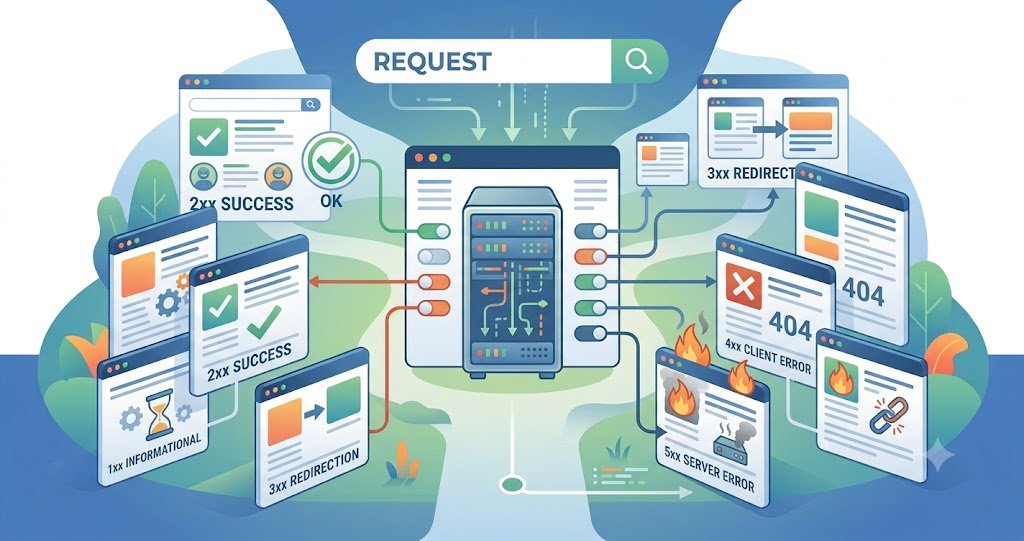
When a browser or app talks to a web server, the server replies with a three-digit number called an HTTP status code. That number tells the client — instantly — whether the request worked, failed, or needs another step. Understanding these codes matters for developers debugging APIs, and for SEOs diagnosing crawl errors, redirect chains, and indexing issues.
Table of Contents
- Key Takeaways
- What Is an HTTP Status Code?
- The Five Status Code Classes
- Most Common Status Codes Explained
- Why Status Codes Matter for SEO
- Conclusion
- FAQs
Key Takeaways
- HTTP status codes are three-digit responses grouped into five classes: 1xx, 2xx, 3xx, 4xx, and 5xx.
- 2xx codes mean success, 3xx mean redirection, 4xx mean client-side errors, and 5xx mean server-side errors.
- 200, 301, 302, 404, and 500 are the codes most people encounter daily.
- Incorrect status codes (like a “soft 404” returning 200) can hurt SEO and crawl efficiency.
- Status codes are defined in official specifications maintained by the IETF, primarily RFC 9110.
What Is an HTTP Status Code?
Every HTTP response starts with a status line containing a status code and a short reason phrase, such as 200 OK or 404 Not Found. These codes are standardized so that browsers, crawlers, and applications can react programmatically — retrying a request, following a redirect, or showing an error page — without needing to parse human language.
The Five Status Code Classes
1xx — Informational
The request was received and processing continues. Example: 100 Continue.
2xx — Success
The request was received, understood, and accepted. Example: 200 OK, 201 Created, 204 No Content.
3xx — Redirection
Further action is needed to complete the request, usually following a new URL. Example: 301 Moved Permanently, 302 Found, 304 Not Modified.
4xx — Client Error
The request contains bad syntax or can’t be fulfilled by the client. Example: 400 Bad Request, 401 Unauthorized, 403 Forbidden, 404 Not Found.
5xx — Server Error
The server failed to fulfill a valid request. Example: 500 Internal Server Error, 502 Bad Gateway, 503 Service Unavailable.
Most Common Status Codes Explained
200 OK — The standard success response; the requested resource was returned as expected.
301 Moved Permanently — The resource has a new permanent URL. Search engines pass most link equity through a 301 and update their index to the new address.
302 Found — A temporary redirect. The original URL should remain indexed since the move isn’t permanent.
304 Not Modified — Tells the client its cached copy is still valid, saving bandwidth.
400 Bad Request — The server can’t process the request due to a client-side error, like malformed syntax.
401 Unauthorized — Authentication is required and has failed or hasn’t been provided.
403 Forbidden — The server understood the request but refuses to authorize it.
404 Not Found — The server can’t find the requested resource. This is one of the most common codes on the web.
410 Gone — The resource is permanently deleted, a stronger signal than 404 for removal.
429 Too Many Requests — The client has sent too many requests in a given time (rate limiting).
500 Internal Server Error — A generic server-side failure with no more specific message available.
503 Service Unavailable — The server is temporarily unable to handle the request, often due to maintenance or overload.
Why Status Codes Matter for SEO
Search engine crawlers rely heavily on status codes to decide how to treat a URL. A page that should be removed but returns 200 OK (a “soft 404”) wastes crawl budget and can stay indexed incorrectly. Improper use of 302 instead of 301 for permanent moves can delay the transfer of ranking signals. Servers that intermittently return 5xx errors can trigger crawl rate throttling or temporary de-indexing if the issue persists.
Conclusion
HTTP status codes are a small but essential part of how the web communicates. Knowing the difference between a 301 and a 302, or a 404 and a 410, helps developers build more reliable systems and helps SEOs protect rankings during migrations, redesigns, and cleanups. When in doubt, match the status code to the actual state of the resource — that’s the single most reliable rule.
Frequently Asked Questions (FAQs)
Q: What is the most common HTTP status code? A: 200 OK is the most common, since it represents a successful, ordinary response.
Q: What’s the difference between 301 and 302 redirects? A: A 301 signals a permanent move and passes most SEO value to the new URL; a 302 signals a temporary move and keeps the original URL as the canonical one.
Q: Should I use 404 or 410 for deleted pages? A: Use 410 when you want to explicitly signal permanent removal; 404 is fine for general “not found” cases where the removal isn’t intentional or final.
Q: Who defines HTTP status codes? A: They’re standardized by the IETF, currently documented in RFC 9110 (HTTP Semantics), which consolidated and updated earlier HTTP/1.1 specifications.
Q: Can a status code affect Google rankings? A: Yes — incorrect codes (like soft 404s or excessive server errors) can affect crawling, indexing, and ranking signal transfer.